Google Ads getting clicks but no conversions? 9 causes you can check yourself
Your Google Ads campaign is getting clicks, but no calls, no form fills, no leads. Usually one of nine causes is behind it, and you can check most of them yourself in the account or on your own site. Each one below comes with where to look.
The short answer
When Google Ads gets clicks but no conversions, first find out whether leads are really missing or just not being counted. Then check whether the right people click at the right time in the right place, and whether your landing page makes the next step easy.
- Tracking first: conversion actions, calls and the "Conversions" column.
- Then search terms: broad match is the default match type.
- Then location and schedule: defaults are "Presence or interest" and "All day".
- Then the landing page: does it match the search, is contacting you quick on a phone?
- Check bots last: Google filters invalid clicks out and doesn't charge for them.
Turn clicks into leads
The 9 causes, and where to look
| Cause | Where to check |
|---|---|
| 1. No or broken conversion tracking | Conversion actions in the account |
| 2. Calls aren't counted | Call assets, call reporting |
| 3. Wrong action set as primary | "Conversions" vs "All conv." |
| 4. Irrelevant search terms | Search terms report |
| 5. Missing negative keywords | Negative keyword lists |
| 6. Ads shown to people elsewhere | Campaign location options |
| 7. Ads run when nobody answers | Ad schedule |
| 8. Landing page doesn't match | Quality Score, the page itself |
| 9. Hard to contact you on mobile | Your site, on your own phone |
The order matters. Until tracking is right, every other number is guesswork. For a full account review, use the Google Ads audit checklist.
No leads, or leads that aren't being counted?
Often the leads do arrive, but Google Ads can't see them. The campaign looks like a failure, and Smart Bidding learns from the wrong signal.
1. Tracking is missing or broken
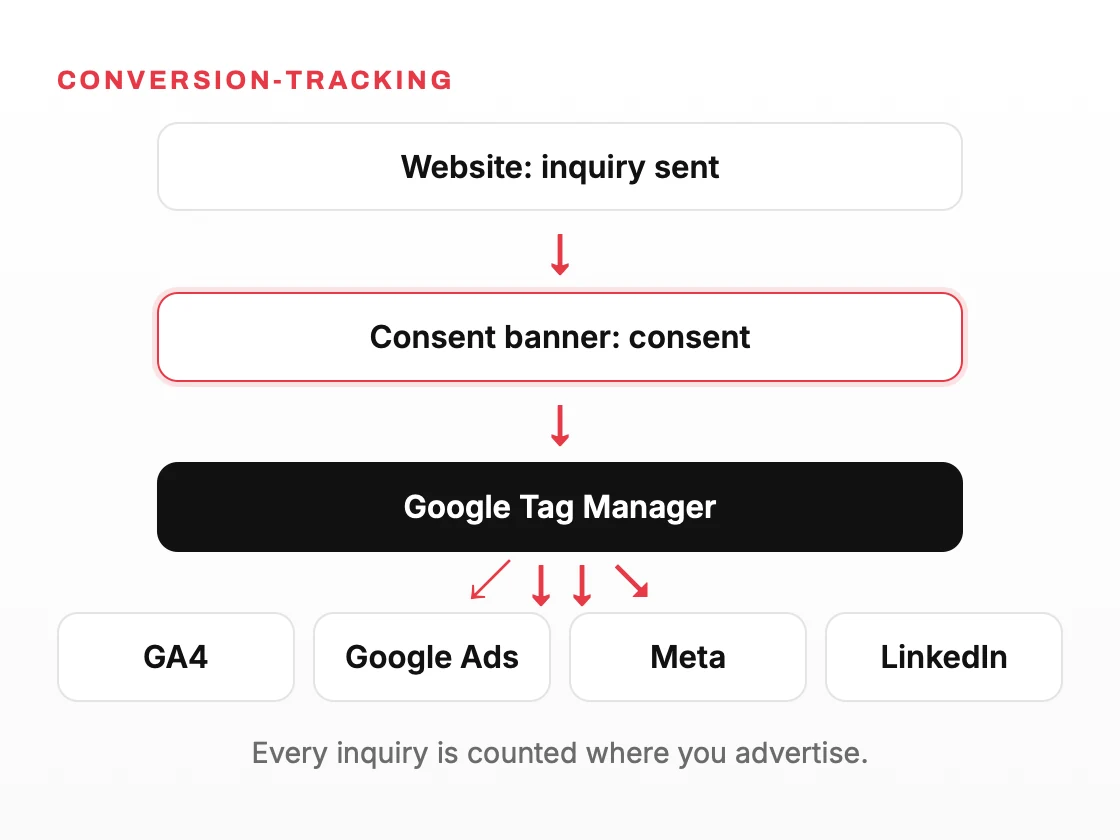
Google Ads only counts a lead if a conversion action exists for it, set up through the Google tag or Google Analytics for web forms. Check in the account that a conversion action exists for your lead at all, and that it is receiving data.
2. Phone calls aren't counted
If customers prefer to call, you'll only see it with call reporting. It uses Google forwarding numbers and is only available on the Search Network. Calls to the number on your website need their own conversion action.
3. The wrong action is primary
The "Conversions" column only shows primary actions. Secondary ones appear only under "All conversions". If your lead form is secondary, "Conversions" reads zero.
Compare the leads in your inbox and call log with the "Conversions" column. If they're far apart, you have a tracking problem, not an advertising problem.
Sources: Google Ads Help, "About conversion measurement", "About primary and secondary conversion actions" and "About call assets", checked on November 23, 2026.
If you'd rather not set up the measuring yourself: conversion tracking setup with Google Tag Manager, GA4 and a consent banner.
Wrong searches: what people actually typed
A keyword is what you bid on; a search term is what someone actually types. With broad match, the default match type in Google Ads, your ad can show on searches that are only related to your keyword.
"plumber apprenticeship"
"emergency plumber near me"
"how to fix a leaking tap"
"leaking pipe repair today"
"plumber salary"
"plumber quote bathroom"
The search terms report shows which searches brought clicks. Anything that doesn't fit goes on your negative keyword list. Note that negative keywords don't match close variants, so add singular, plural and synonyms yourself.
The search terms above are a made-up example. Sources: Google Ads Help, "About the search terms report", "About keyword matching options" and "About negative keywords", checked on November 23, 2026.
Wrong place, wrong time
Two default settings don't suit every business. Both take minutes to change.
6. Location: "Presence or interest"
By default, Google shows your ads to people in or regularly in your target area, and to people who've only shown interest in it. If you only serve locally, consider "Presence". Google suggests it when you only want to reach people in the targeted locations.
7. Ad schedule: "All day"
Without a schedule, ads can run around the clock. If most leads call and nobody picks up at night, those clicks are wasted. The ad schedule lets you pick days and hours or adjust bids for them.
Check the day and hour report for when clicks come in without leads before you switch hours off completely.
Sources: Google Ads Help, "About advanced location options" and "About Ad Scheduling", checked on November 23, 2026.
The landing page: where the lead is won or lost
Google rates the landing page experience for each keyword. Pages with higher ratings, Google says, are usually well organized and have text that relates to the person's search. A "below average" status is a reason to look at the page.
- Does it match?Someone searching "bathroom remodel" lands on the bathroom page, not the homepage.
- Is it obvious?Service, area and next step sit at the top.
- Works on a phone?A call button and a short form.
- Does it work?Send a test lead: does the email arrive?
Google's mobile guidance says to keep the steps to complete a form as few as possible. A form that hangs on a phone, or emails that land in spam, waste every click you pay for.
Need a page built for your ads? Web design in Vienna.
Sources: Google Ads Help, "Landing page experience: Definition" and "Optimize your website for mobile", checked on November 23, 2026.
Is it bots or click fraud?
It's a common suspicion. Before you assume it: Google filters out invalid clicks, meaning accidental, automated or fraudulent ones, and doesn't charge for them.
Add that column. If the number is small, the cause is more likely one of the eight above.
Source: Google Ads Help, "Invalid clicks: Definition", checked on November 23, 2026.
If you'd rather not check it yourself
Most of these checks take an afternoon. If you want an outside view or simply lack the time, have the account reviewed.
Frequently asked questions
Why am I getting clicks but no conversions on Google Ads?
Usually for one of three reasons: leads aren't being counted (tracking, calls), clicks come from the wrong searches, places or hours, or the landing page makes contacting you too hard. Check them in that order.
Does Google Ads count phone calls as conversions?
Only if you set it up. Calls from your ads are counted with call reporting, which uses Google forwarding numbers on the Search Network. Calls to the number on your website need their own conversion action.
Are my Google Ads clicks from bots?
Check before you assume it. Google filters invalid clicks automatically and doesn't charge for them. The "Invalid clicks" column shows how many there were.
Why are my Google Ads not working anymore?
If leads dropped suddenly, check tracking first: a changed website, a new form or a removed tag can stop conversions from being counted. Then look at the search terms report for new, unrelated searches.
How do I set up conversion tracking in Google Ads?
Create a conversion action for your lead, such as a form submission, and choose the Google tag or Google Analytics as the data source. Calls need an action of their own.
How do I know if my landing page is the problem?
Look at the landing page experience status for your main keywords, then open the page on your own phone from an ad-like search. If the service, area and contact button aren't visible right away, start there.
Turn clicks into leads
In a free first call, we'll look at where your campaign loses clicks today and what to fix first.
In 30 minutes you get:
- an honest view of which channel and budget fit your start
- then your quote

Anastasia
I'll get back to you personally.