Google Tag Manager
One container for your site, holding the Google, Meta and LinkedIn tags. Google notes you don't need a container for each page. Every change is checked in preview mode before it's published.
Adoro sets up conversion tracking for small and mid-sized businesses in Vienna, Austria and remotely: Google Tag Manager, GA4 key events, Google Ads conversions with enhanced conversions, the Meta Pixel with the Conversions API and the LinkedIn Insight Tag, all wired to your consent banner through Consent Mode v2. You end up with numbers your campaigns and bid strategies can rely on, tested in Google's and Meta's own tools.
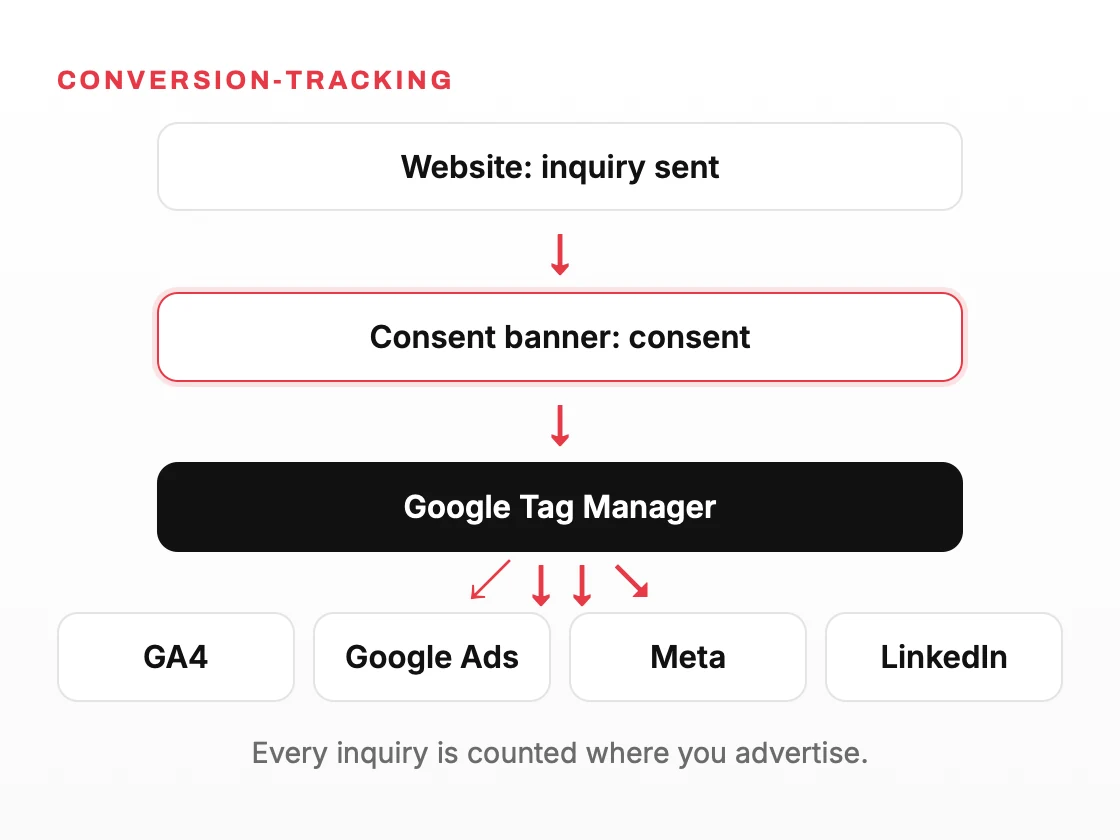
Conversion tracking records what happens after someone clicks your ad: a form sent, a call, a booking or a purchase. Without it, neither you nor Google nor Meta can tell which ads bring customers, and automated bidding has nothing to learn from. A proper setup measures each of those actions once, correctly, on every ad platform you use.
It starts with deciding what counts. In Google's words, you choose what you identify as valuable, such as a purchase, a sign-up or a phone call. Each of those actions then gets measured on every platform you advertise on.
One container for your site, holding the Google, Meta and LinkedIn tags. Google notes you don't need a container for each page. Every change is checked in preview mode before it's published.
Google Analytics 4 now calls important actions key events, for example generate_lead when a form is sent. Any event you collect can become a key event, and a linked Google Ads account can turn it into a conversion.
Conversion actions for forms, calls and purchases, each set as primary (used for bidding) or secondary (observation only). Plus enhanced conversions: contact details from the form are hashed with SHA256 and sent to Google to make measurement more accurate.
The Pixel measures in the browser; the Conversions API sends the same events from your server or website platform. Both carry the same event_id and event name, so Meta can deduplicate them.
The Insight Tag on every page, deployed through Google Tag Manager if you like, and conversions in Campaign Manager for form submissions, thank-you pages or button clicks.
Your consent banner is connected to Consent Mode so Google's tags respect each visitor's choice. The Meta Pixel gets the same choice through its own consent call.
If your ads already run but leads don't show up, tracking is the first thing to check: Google Ads clicks but no conversions. Adoro also runs the campaigns themselves as a Google Ads agency in Vienna and Meta ads agency in Vienna.
Sources: Google Ads Help, “About conversion measurement” and “About enhanced conversions”; Analytics Help, “Conversions vs. key events in Google Analytics”; Tag Manager Help, “Create an account and container”; Meta for Developers, Conversions API and “Handling Duplicate Pixel and Conversions API Events”; LinkedIn Help, “Add the LinkedIn Insight Tag to your website”; checked on November 25, 2026.
Each platform measures with its own tag and checks it with its own tool.
| Platform | What measures | How to test |
|---|---|---|
| Google Ads | The Google tag, or GA4 key events imported | Tag Assistant and the conversion action status |
| Google Analytics 4 | Events marked as key events | Tag Assistant and Tag Manager preview mode |
| Meta | Meta Pixel plus Conversions API | Test Events in Meta Events Manager |
| Insight Tag plus conversion rules | Insight Tag status in Campaign Manager |
For Google Ads, Google lets you use Google Analytics, the Google tag or both as the data source. It recommends the Google tag if you need Ads-specific features like enhanced conversions. After you link accounts or mark a key event, Google says it can take 24 to 48 hours before the import option appears.
For LinkedIn conversion tracking, the Insight Tag must be installed before a conversion can be verified. LinkedIn notes that image-pixel conversions are less accurate than tag-based ones and can't use enhanced conversion tracking, so the JavaScript tag is the default choice.
Sources: Google Ads Help, “About conversion measurement”; LinkedIn Help, “Set up Conversion Tracking for Insight Tag conversions”; checked on November 25, 2026.
Consent Mode tells Google what each visitor chose in your banner, and Google's tags adjust their behavior to match. Google states that Consent Mode doesn't provide a banner itself; it works with yours, for example one from a consent management platform (CMP).
Google tags wait until the visitor uses the banner
Google tags load right away, set to denied by default
Without consent nothing reaches Google, not even the status
Without consent, cookieless pings are sent
Conversion modeling uses a general model
Conversion modeling uses an advertiser-specific model
Version 2 works with four parameters: ad_storage, ad_user_data, ad_personalization and analytics_storage. Google says ad_user_data is required for measurement such as enhanced conversions and tag-based conversion tracking. For end users in the European Economic Area (EEA), Google requires consent signals to keep measurement, ad personalization and remarketing working (Google Ads Help, EU user consent policy update).
Sources: Google Ads Help, “About consent mode”, “Consent mode reference” and “Manage user consent”; Google, EU user consent policy; Google for Developers, “Consent mode overview”; Meta for Developers, “General Data Protection Regulation”; checked on November 25, 2026.
Does your ad account count the leads you really get?
Every conversion is triggered by hand and checked in each platform's own tool before any campaign bids on it.
Sources: Tag Manager Help, “Preview and debug containers” and “Verify consent mode implementation”; Google Ads Help, “The Unverified status has been showing for more than 24 hours”; Meta for Developers, “Using the Conversions API”; LinkedIn Help, “Add the LinkedIn Insight Tag to your website”; checked on November 25, 2026.
Google's help center has no article for this exact wording, as of November 25, 2026. What it does document are the statuses a conversion action can have on the Conversions page under Summary, and that clicking a status shows its alerts and next steps. A new action showing "Unverified" simply means, per Google, that its tag hasn't fired yet.
| Status | What Google says it means |
|---|---|
| Active | Everything is working as intended. |
| Needs attention | There are action items, but conversions are still being recorded. |
| Misconfigured | Conversions have stopped because of a setup error or a broken tag. |
| Awaiting conversions | No conversions were recorded in the last 7 days. |
| Removed | The action was deleted or archived and no longer tracks data. |
The fixes Google lists: set the conversion action to Primary, accept the terms of service for enhanced conversions, and don't try to map an automatically created conversion action to a Tag Manager tag. That needs a manually created action with its own conversion ID and label. Reports can also take 3 to 24 hours to update.
Why it matters: if a campaign bids automatically on conversions and the tracking isn't right, Google says your ads may have limited serving.
Sources: Google Ads Help, “Conversion Tracking: Troubleshooting conversion tracking status”, “Troubleshoot your conversion tracking status”, “The Unverified status has been showing for more than 24 hours” and “Google Ads not running: Conversion tracking issues”; checked on November 25, 2026. The exact message in your account may differ; the status tooltip is the authority.
You'll need access to your website, or someone who has it, plus access to Google Ads, Google Analytics, Meta Business Manager and LinkedIn Campaign Manager. The work happens remotely, so the business can be anywhere. Building a new site? Tracking can go in from day one: web design in Vienna.
Create a conversion action in Google Ads under Goals, for example for a form or a call, and choose the Google tag or Google Analytics as its data source. Install the tag on your site or through Google Tag Manager, then test it with Tag Assistant. The action moves from Unverified to Active once the first conversion is recorded.
A key event is an action in Google Analytics that matters to your business. A conversion, in Google's current wording, is an action you use to measure ad campaigns and steer bidding. With linked accounts, a GA4 key event can become a Google Ads conversion.
Google's help center doesn't define this exact wording. Check the conversion action's status on the Conversions page and click it: Google shows the alerts and next steps there. Causes Google lists include actions not set to Primary, unaccepted terms for enhanced conversions, and tags that haven't fired yet.
If you use Google Ads or Google Analytics for users in the EEA, Google requires consent signals to keep measurement, ad personalization and remarketing working. Consent Mode is Google's way of passing those signals from your banner. Whether your banner meets the law is a question for your lawyer or data protection advisor.
It works on its own, but Meta recommends adding the Conversions API, which sends the same events from your server or website platform. To avoid double counting, both events carry the same event_id and event name.
Install the LinkedIn Insight Tag on every page, directly or through Google Tag Manager, then create conversions in Campaign Manager, for example for a thank-you page or a button click. LinkedIn only verifies conversions once the Insight Tag is installed.
Send the link to your website and the platforms you advertise on. In a free first call, we look at what's measured today and what to fix first.
In 30 minutes you get:

I'll get back to you personally.